
Using the FACTORY audit tracker
Factory audits generate a lot of paperwork, and most of it sits unread once the report lands in an inbox. The Factory Audit Tracker on The Chain changes that by pulling structured, searchable data out of every audit PDF a brand uploads, using AI to do the heavy lifting.
The process starts in the Factory Audit Tracker page, reached through Verification, then Factory Audit Tracker, then View Data. This page holds two things: a live feed of AI Extraction Jobs, which shows what is currently being processed, and the Audit Records table, which holds every completed audit and certification on file.
Adding an audit takes a few fields. Click Add Audit and complete:
Audit name, a descriptive label such as "SMETA Audit 2026"
Audit type, such as SEDEX, SGS, or QIMA
Valid until, the audit expiry date
Supplier name, the factory being audited
One or more PDFs, uploaded and processed separately by the AI, then click Save
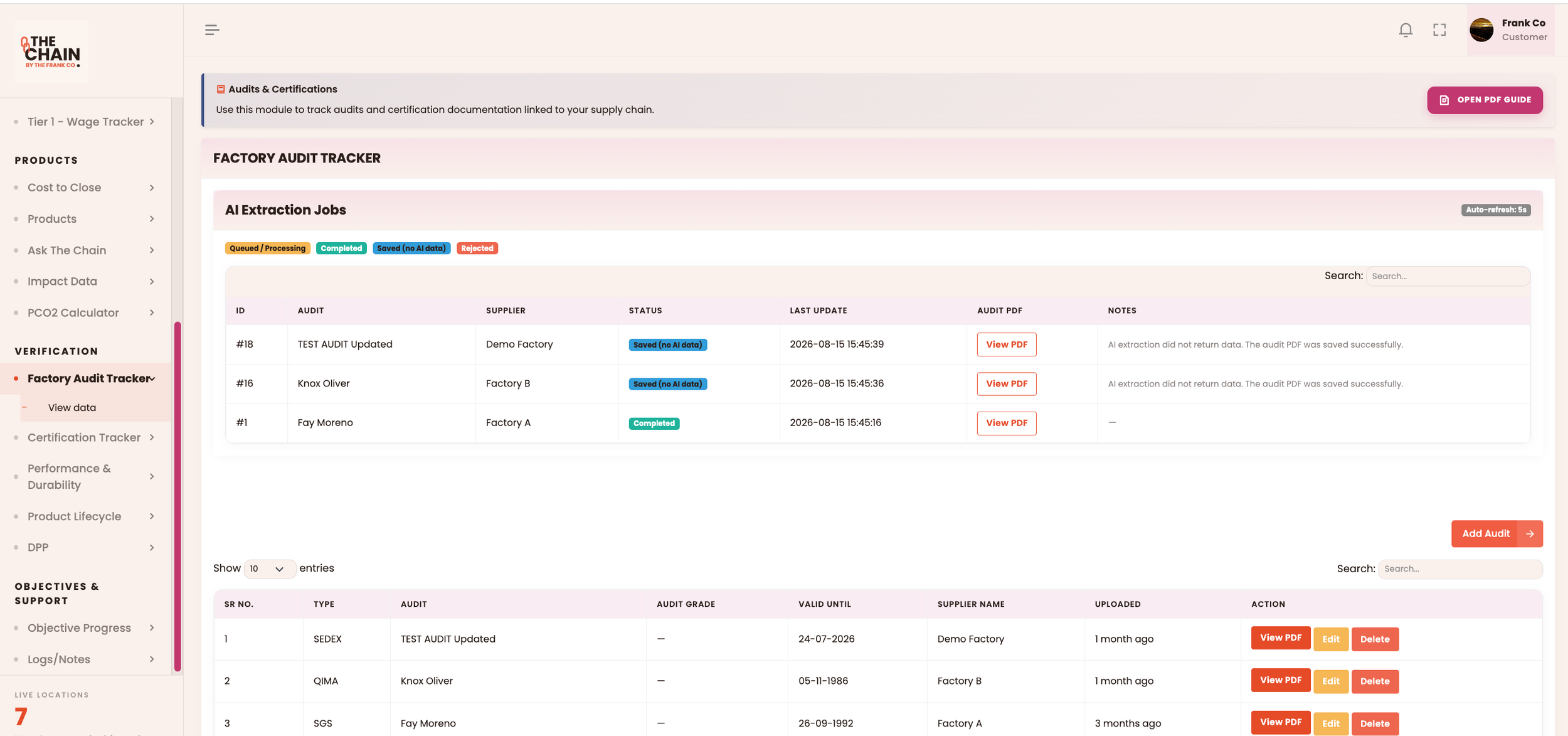
Once submitted, the PDF appears in AI Extraction Jobs and moves through one of four states:
Queued / Processing, meaning the AI is still reading the document
Completed, meaning it extracted the audit data successfully
Saved (No AI Data), meaning the file was stored but the AI could not pull structured details from it, often because of poor scan quality
Rejected, meaning the file failed to process or could not be read at all
Whatever the outcome, the original PDF stays stored and viewable, so nothing is ever lost even if extraction fails.
The Audit Records table is where the finished work lives. Each row shows the audit type, name, grade, expiry date, supplier, and upload date, all searchable through the table controls. Clicking View PDF opens the original report, which lets teams double check findings, confirm compliance details, or pull evidence for a buyer's request.
Editing is flexible too. Click Edit to:
Update the audit name, type, expiry date, or supplier
Uncheck a document to remove it when saving
Add further PDFs without triggering the AI to reprocess files already on record
Deletion is available for records added in error, though it should be used sparingly since audit history is often needed for future reference.
The tracker earns its keep by reducing the gap between having a document and having usable data. Instead of a compliance team manually re-reading audit reports every time a question comes up, the AI extraction turns each PDF into a structured record that can be searched, compared, and trusted. For brands managing audits across several factories, that shift from paper to data is what keeps compliance both accurate and quick to check.
To schedule a demo, please contact us at info@thefrankco.com